To run the configured main class for your project, you may use the :Java command, which executes java and displays the results in a temporary buffer.
Note
Please note that this command is not intended to be a full replacement for the more advance support provided by eclipse, ant, or maven.
The :Java will locate the main class to run using the following steps:
When editing a java file, eclim provides the command :JavaClasspath which will echo the project’s resolved classpath entries separated by the system path separator or a supplied delimiter:
:JavaClasspath
:JavaClasspath -d \\n
If you would like to get the classpath from a script, you can also call eclim directly:
$ $ECLIPSE_HOME/eclim -command java_classpath -p <project_name>
To view a list of all the JDKs/JREs that eclipse is aware of, eclim provides the command :JavaListInstalls.
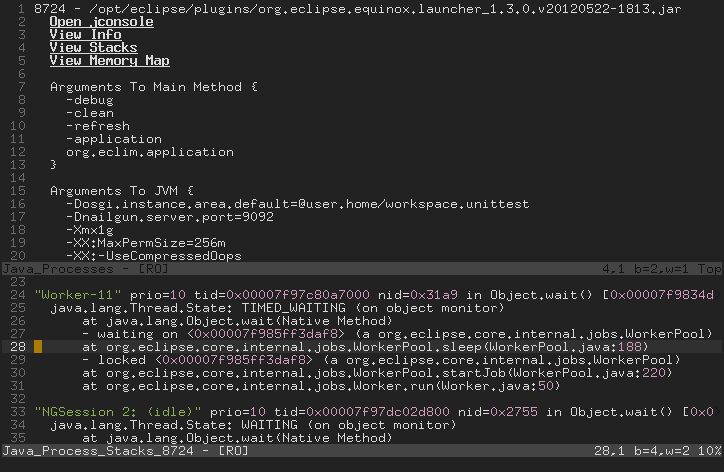
As of Java 1.5 (Java 5.0), the sun jdk started shipping with some useful tools for viewing information about running java processes. To provide quick and easy access to some of the information these commands provide, eclim exposes the command :Jps.
Note
For more information on the jdk tools you may view the online documentation.
When invoked it will open a window containing information about the current processes and some links for viewing additional info (depending upon availability of required tools on your platform).
Example content: